
- Platforms Support
-
8
- Conversion Speed
-
8
- Output Formats
-
9
- Pricing
-
7
- Customer Support
-
8
Many music fans want to download and convert music to MP3 for offline listening, an all-in-one-music converter is necessary to help you. As the best All-in-One streaming Music Converter, it should be able to download music from streaming services and convert them as lossless local MP3 files, UkeySoft MusicOne Converter is one of the top-rated multi-platform tools. We have tested this music converter tool kits to convert music from different streaming services. Let’s view this review contents to deeply analyze its features, convert speed, output quality, pros and cons.
Established in 2018, UkeySoft has developed a range of powerful music converters for the world’s most popular streaming music platforms and continues to expand its product lineup. Its brand-new UkeySoft All-in-One Music Converter, it is a powerful solution tailored to convert Spotify music to MP3 for permanent offline listening, as well as convert music from Apple Music, YouTube Music, Amazon Music, Tidal, Deezer, SoundCloud, and Pandora Music.
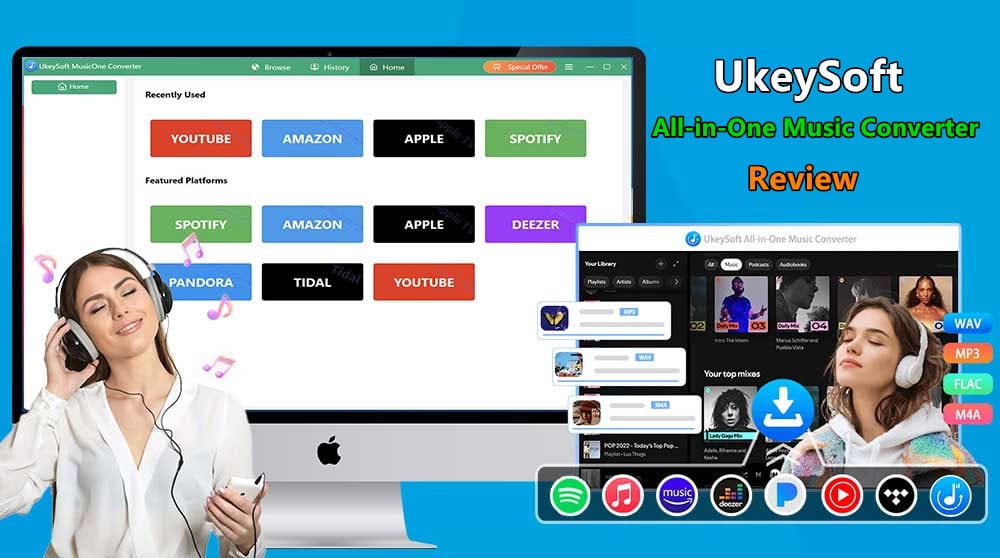
Many music lovers want to know is UkeySoft All-in-One Music Converter worth buying? Is it safe? What’s the pros and cons in UkeySoft MusicOne Converter? Is it legal to convert streaming music to MP3? In this comprehensive UkeySoft All-in-One Music Converter review, we’ll take an in-depth look at its product lines, features, performance, pricing, pros, cons, and overall value to help you decide whether it’s the right music downloader for your needs.
What is UkeySoft All-in-One Music Converter?
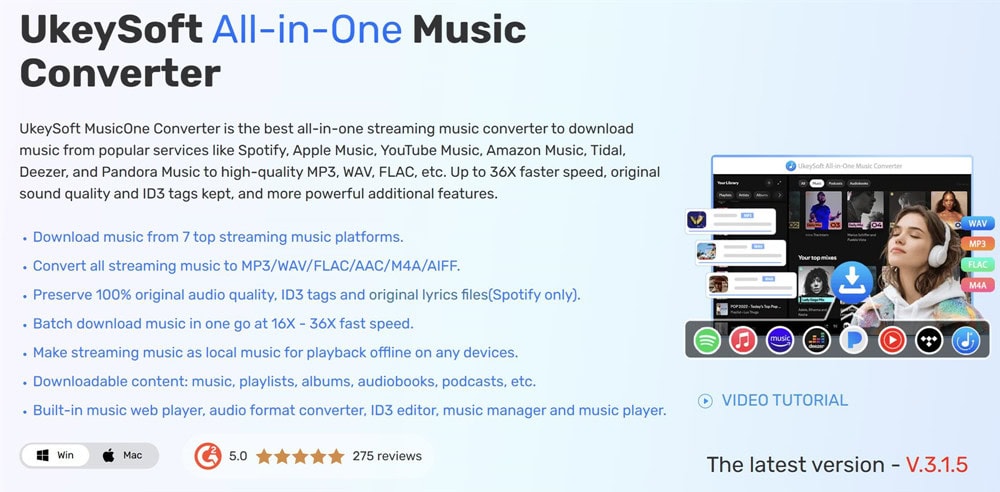
UkeySoft All-in-One Music Converter is a professional streaming music converter to help you download and convert tracks, playlists, and audiobooks from 8 streaming services like Spotify, Apple Music, YouTube Music, Amazon Music, Tidal, Deezer, SoundCound Music and Pandora Music into MP3, WAV, AAC, FLAC and other plain audio formats for offline playback on any devices anytime.
UkeySoft Music Converter has integrated with all 8 mainstream music platforms into a single application, delivering you a seamless, efficient, and user-friendly solution for downloading, playing and managing streaming music offline in one place. It supports downloading songs, playlists, albums, podcasts, and audiobooks to MP3, AAC, FLAC, WAV or other formats while preserving the original sound quality. Whether you’re using a Free or Premium account, UkeySoft makes it easy to build a permanent offline music library compatible with virtually any device.
UkeySoft Product Line (2026 Versions)
As of 2026, UkeySoft offers 8 primary music converters.
- UkeySoft Spotify Music Converter
- UkeySoft Apple Music Converter
- UkeySoft Amazon Music Converter
- UkeySoft Deezer Music Converter
- UkeySoft Tidal Music Converter
- UkeySoft YouTube Music Converter
- UkeySoft Pandora Music Converter
- UkeySoft SoundCloud Music Converter
Supported Output Formats: MP3, M4A, AAC, WAV, FLAC, AIFF
These formats support nearly every media player, MP3 player, iPod, smartphone, smart TV, USB drive, car stereo, game console, smart speaker, smart watch, and portable music player.
What Makes UkeySoft All-in-One Music Converter Stand Out?
1. Supports All Popular Music Streaming Services
UkeySoft All-in-One Music Converter is a desktop application, compatible with both Windows and mac OS. It supports popular streaming music platforms, including Spotify, Apple Music, Amazon Music, TIDAL, Deezer, YouTube Music, and Pandora Music. Instead of switching between multiple music downloaders, you can select any of the streaming music services, then access and download all types of music content directly from a single application.
2. Convert Streaming Music to Multiple formats
UkeySoft MusicOne Converter allows you to decide your own streaming experience offline by freely adjusting the output format and output quality, it can convert streaming music to DRM-free audio formats such as MP3, M4A, FLAC, WAV, AAC, and AIFF to select. Also, the audio quality ranges from standard options to the highest 320kbps, 640kbps, or lossless. Even for the Spotify Free or YT Free users can export 320kbps MP3 files. This way, you can keep your favorite music forever, even if the subscription ends.
3. Download All Music Content to Local Computer
UkeySoft All-in-One Music Converter works on all account types, including the free trial, ad-supported plan, or Premium plan. It not only lets you download songs, albums, playlists, artists, podcasts, audiobooks, stations, and even music videos (YT Music only), but also removes the annoying ads in the music. What’s even better? It features a built-in official web player, allowing you to browse, search, and download music from one convenient interface. Simply log into your streaming account, you can easily download and save all types of streaming content directly to your computer folder.
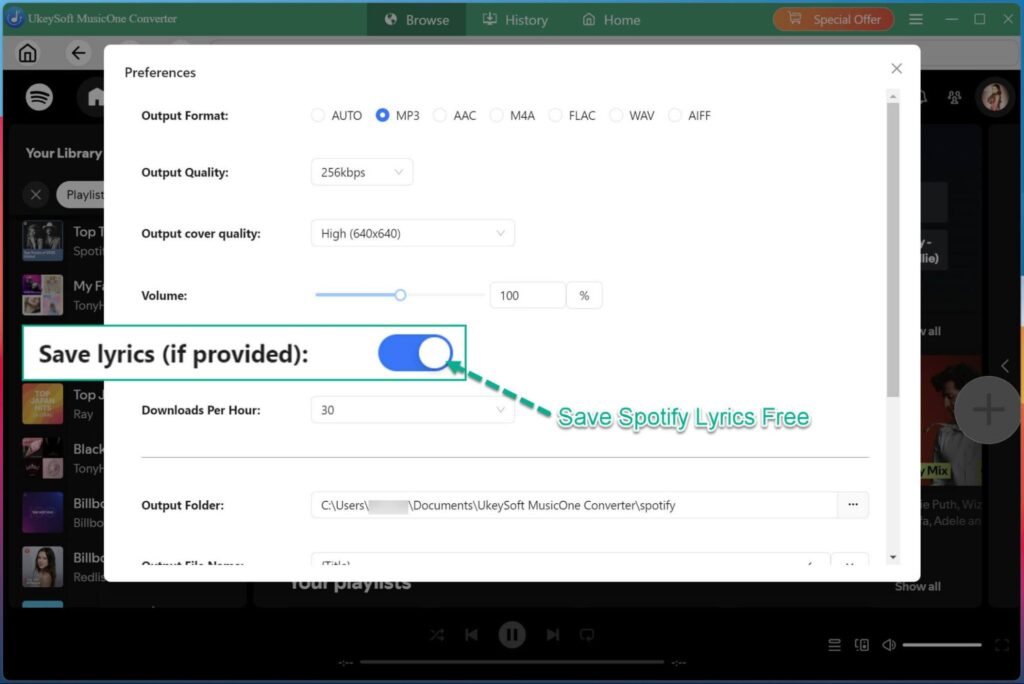
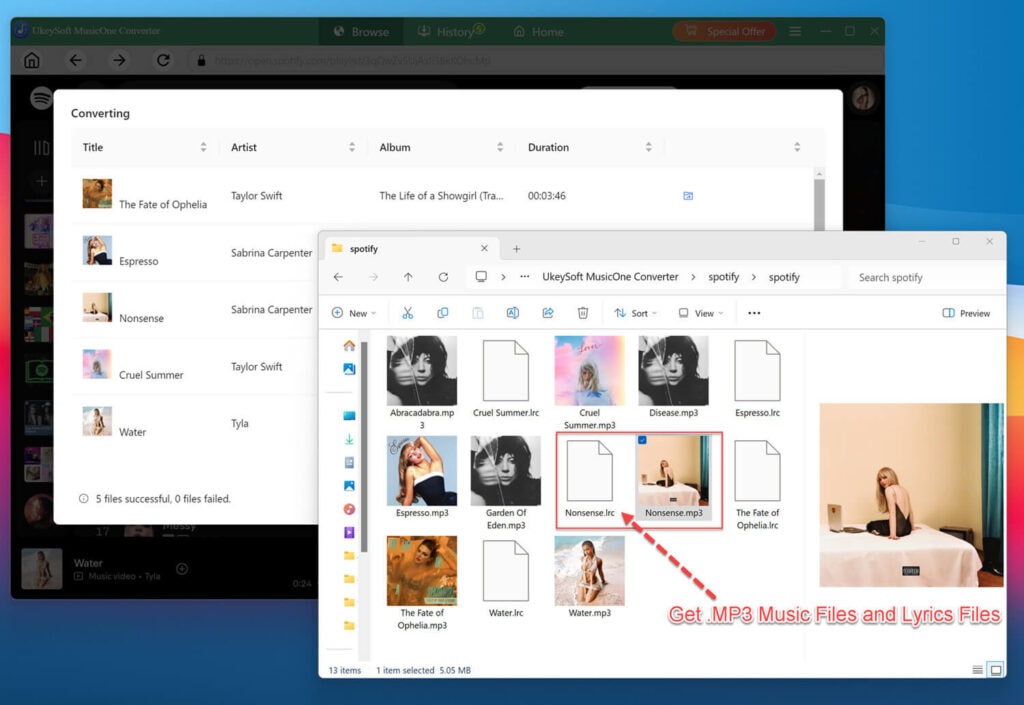
Another attractive feature of UkeySoft is its ability to retain complete ID3 tags and metadata for each music track. Before conversion, it empowers you to organize the output file name based on ID tags, including title, artist, album, tracks number, playlist index, etc. This makes it much easier to organize, search, and manage your offline music library. For Spotify users, you can even download Spotify lyrics as LRC files and view the lyrics with other media hubs.
5. Speed Up Batch Downloading Performance to 36X Faster
UkeySoft All-in-One Music Converter uses advanced acceleration technology to makes the process incredibly efficient. It supports up to 36X faster conversion speed and batch downloading, allowing you to save entire playlists, albums, or artist collections in just a few clicks. During our testing, a single track downloaded in less than 20 seconds, while a playlist of 15 songs took around 5 minutes to complete.
How Does UkeySoft All-in-One Music Converter Work?
UkeySoft All-in-One Music Converter has a clean and user-friendly interface. Users can easily download music from streaming music platforms for offline listening and saving, no computer skill is required. We take Spotify as an example, show you the step-by-step guide to download Spotify music to MP3.
Step 1. Launch UkeySoft MusicOne Converter and Login Music Account
Fire up UkeySoft All-in-One Music Converter, choose your preferred streaming service in the interface. For example, here we select Spotify and click its icon.
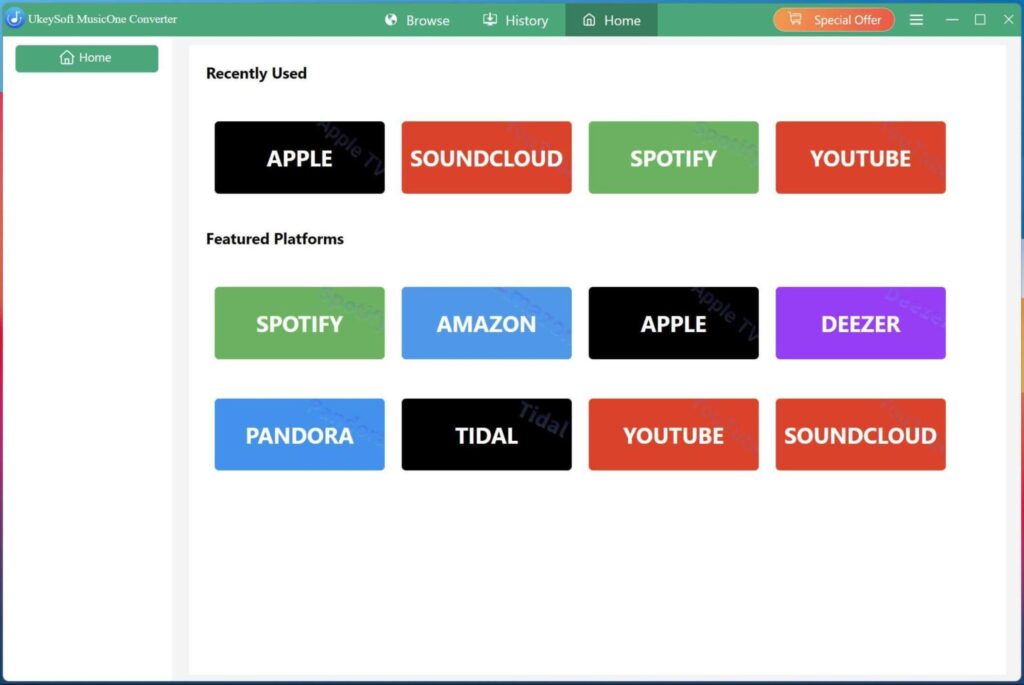
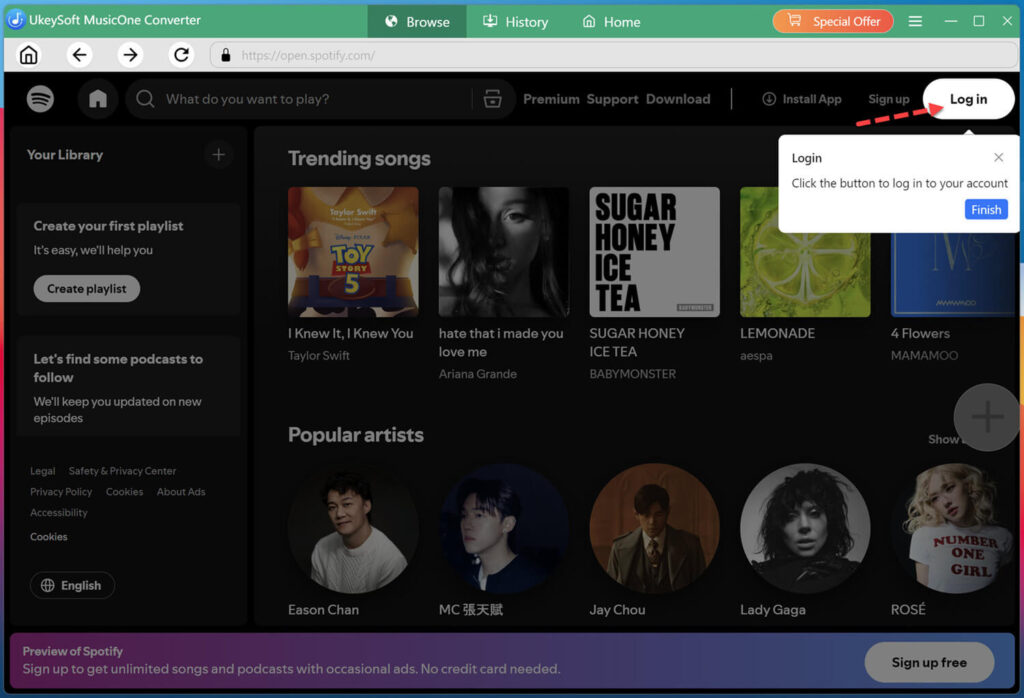
Next, log in to your account through the built-in web player. Here I sign in with my Spotify free account.
Step 2. Modify the Output Settings
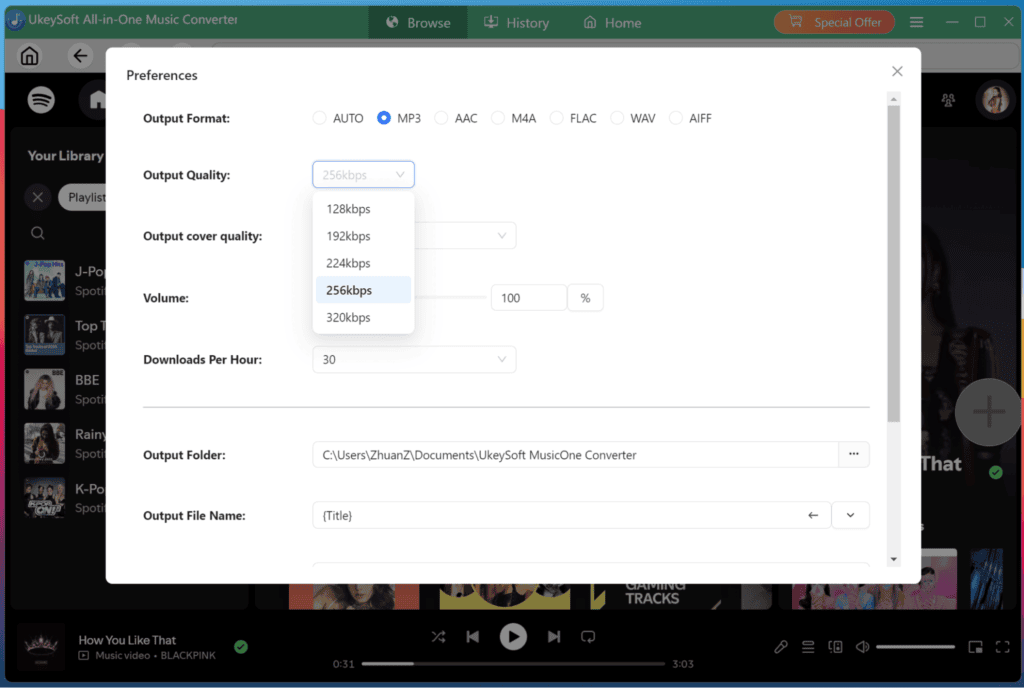
Hit on the “Menu” icon at the upper right corner, and click the “Preferences” option. It will pop up a new window, from where you can customize the output format, output quality, output cover quality, output folder, output file name, and more.
To download Spotify music with lyrics kept, make sure the “Save lyrics” option is enabled.
Step 3. Search and Add Playlist/Album to Download
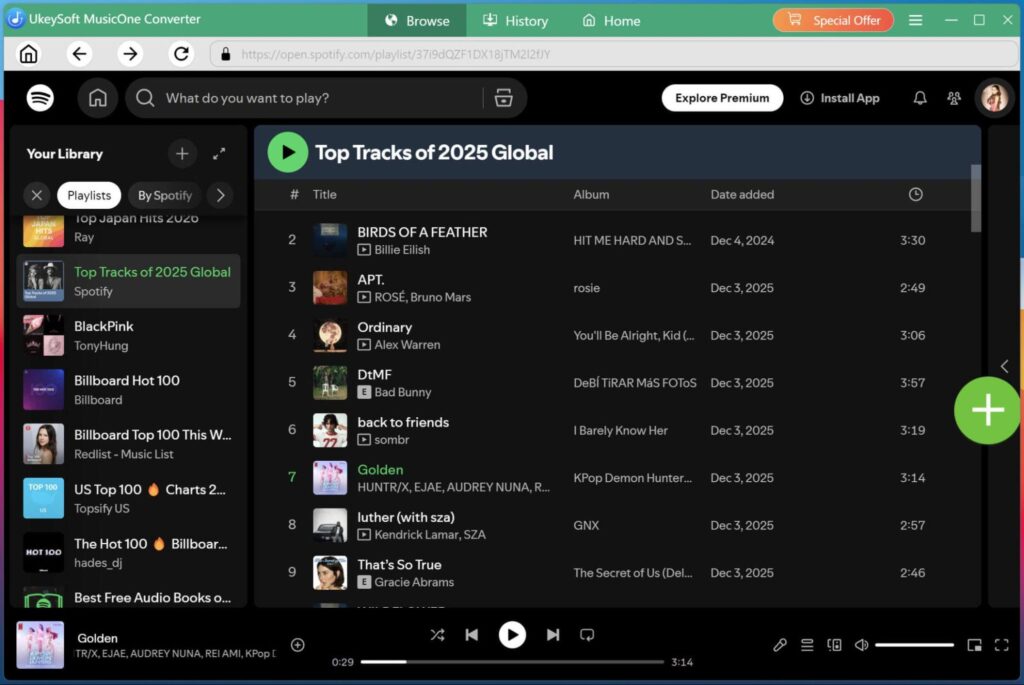
Now, browse and open any song, playlist, album, or podcast, then click the green “+” icon on the right side. Once music is added successfully, check and confirm your selected tracks in the converting list.
Step 4. Download Spotify Music to MP3
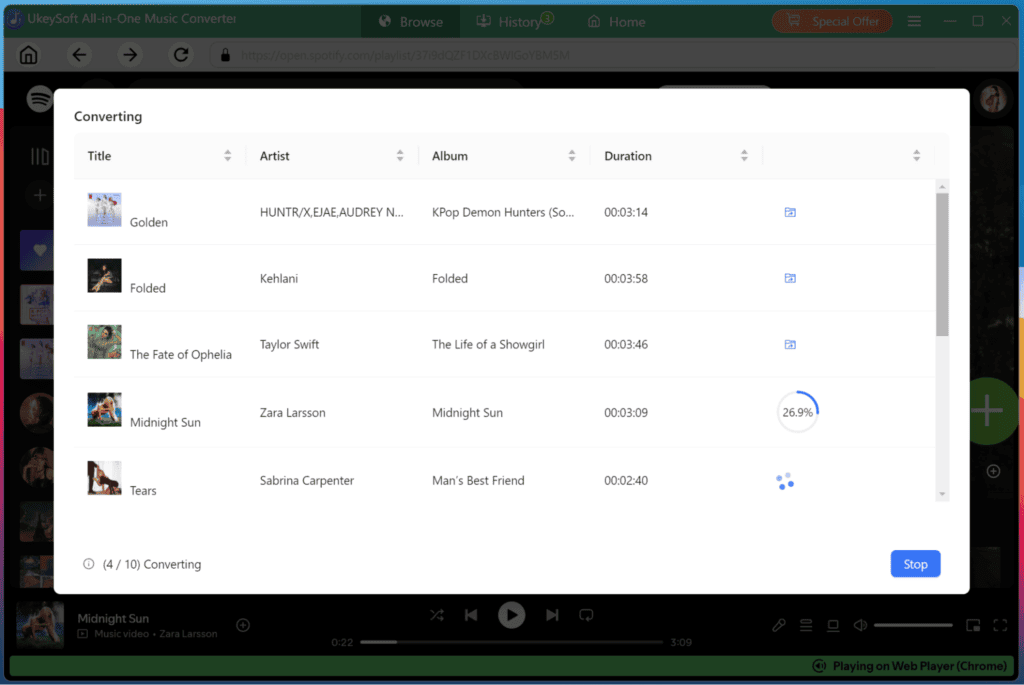
Click on the “Convert” button, the software will begin to convert all selected Spotify tracks to MP3 or other format you set.
Step 5. Get Output Spotify Music Files
After the conversion is complete, click on the “Blue Folder” icon to open the output folder. All downloaded Spotify songs are saved in MP3 format with ID3 metadata and lyrics.
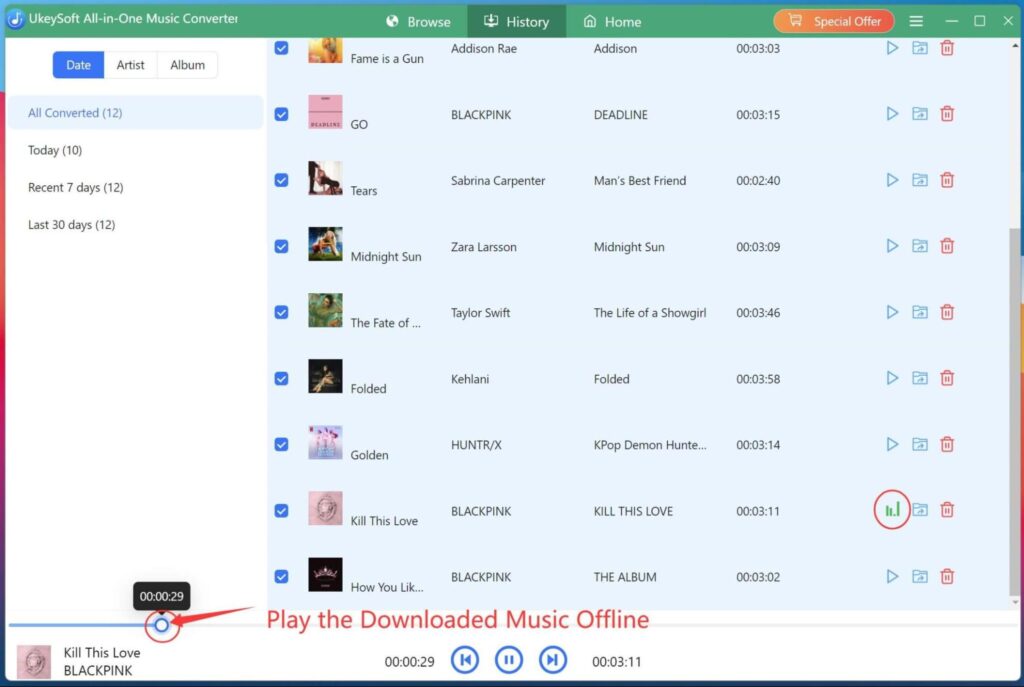
Step 6. Play MP3 Music Offline
Open the built-in Music Player in the software, now you are able to play those downloaded MP3 music files with the built-in music player, simply press on the “Play” icon next to the song title.
UkeySoft All-in-One Music Converter: Price and Bundle Options
UkeySoft All-in-One Music Converter offers a free trial, allowing users to test the software before purchasing. During the trial, you can convert the first three minutes of each track to evaluate its download speed, audio quality, and overall performance.
If you’re satisfied with the product, you can upgrade to the paid version. UkeySoft provides several flexible licensing options, including monthly, yearly, and lifetime plans. Users can choose individual music converters, or bundle packages that combine 8 music converters at a discounted price.
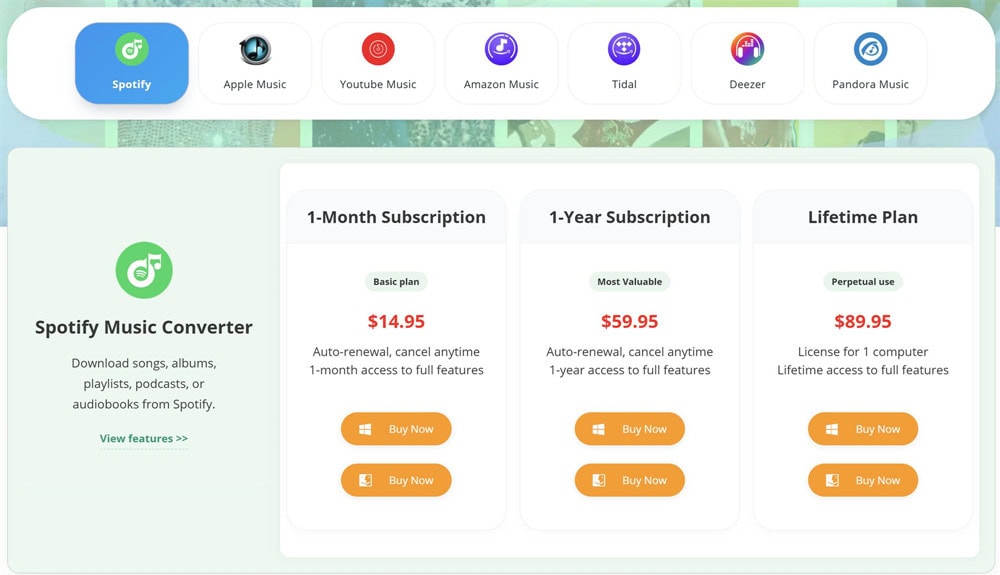
Plan A – Individual Music Converter for 1 Music Platform:
- 1-Month Subscription – US$14.95 for 1 PC/Mac
- 1-Year Subscription – US$59.95 for 1 PC/Mac
- Lifetime Plan – US$89.95 for 1 PC/Mac
Plan B – Bundle Packages for All-in-One License (8 Music Platforms):
- 1-Month Subscription – US$55.95 for 1 PC/Mac
- 1-Year Subscription – US$129.95 for 1 PC/Mac
- Lifetime Plan – US$159.95 for 1 PC/Mac
All paid plans include unlimited music downloads, free updates, and professional customer support during the license period.
Our Opinion on UkeySoft All-in-One Music Converter
After thoroughly testing UkeySoft All-in-One Music Converter, we found it to be a reliable and user-friendly music downloader with a smooth workflow, excellent playlist handling, and compatibility with seven major music streaming services. It delivers high-quality audio output, fast batch downloads, and an intuitive interface that makes downloading streaming music to MP3 effortless for both beginners and experienced users.
The overall experience is excellent, but it still has some room for improvement, such as free trial limitations and the cancellation process, so we’d confidently rate it 4.5 out of 5 stars. Of course, you also can view the UkeySoft’s user ratings in TrustPilot is 4.8/5
Frequently Asked Questions
Of course. It’s safe and secure to convert streaming music to MP3 format via UkeySoft Music Converter. There are no risks of viruses, ads, or malware. Besides, UkeySoft respects your privacy and does not collect any personal information. Plus, using UkeySoft won’t lead to any account bans or penalties from streaming platforms. UkeySoft has focused on multimedia downloading and conversion for over 8 years and is well-received by many users. Their products are also recommended by many media experts!
Furthermore, UkeySoft regularly updates its software to ensure the best possible experience for users. These updates not only enhance performance but also address any potential security concerns, guaranteeing a safe and seamless music conversion process.
Yes. Using UkeySoft All-in-One Music Converter is legal. It allows users to download and convert music from streaming platforms for personal use, which is perfectly legal. However, it’s important to note that downloaded music can only be used for personal enjoyment and may not be used for commercial purposes.
In other words, as long as you use the downloaded music for personal purposes without distributing it or profiting from it, you are perfectly legal.
Final Verdict
If you’re looking for an easy and reliable way to download streaming music in high quality,UkeySoft All-in-One Music Converter is an excellent choice. In our testing, it performs better than expected. It has the ability to download songs, playlists, albums, audiobooks, and podcasts from seven major streaming platforms and convert them to MP3 or other popular formats for permanent offline playback.
With its intuitive interface, fast performance, and lossless output quality, UkeySoft All-in-One Music Converter is a worthwhile solution for anyone who wants to enjoy music anytime, on any device.