
Recently my computer stops working suddenly, throwing me an error No boot filename received on the monitor screen. Then i thought it was a glitch in my computer. I though it was a serious problem with my hard disk and i felt tensed that my hard drive and entire data in it got corrupted. I started checking about this issue “No boot filename received” on Google, YouTube and other forums, badly i got nothing useful for my situation. Then i decided to work like a geek and started working on this error from all possible ways and i finally managed to overcome with this No boot filename received error without even loosing single KB file from my hard drive.

This kind of No boot filename received errors can be seen on all Windows operating systems like Windows XP, Windows7 and on Windows Vista
Why you see PXE-E53 No boot filename received error?
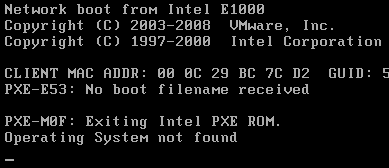
Answer for this question is simple, your computer is unable to find any bootable device so it tried the last choice PXE server. As you are not using PXE server, PC failed to boot from it and struck at error screen.
How to work in order to fix No boot filename received error?
We can’t say exactly what is the reason behind this error PXE-E53 No boot filename received. May be due to glitch in hard drive or Motherboard or Dust or even in old wires.
Start with Hard drive
Don’t panic now, mostly this error say, Your Hard drive is dead. I’m sorry to say, if it was reason for error in your system you are surely going to lose entire data in your hard disk. So i always recommend to take backups frequently. I hope you are not in this phase.
To check whether your hard drive is dead or alive, remove it from the effect computer and connect to another working computer using USB and check, if new hard drive is shown in working computer. If your answer is Yes, you are almost safe. Now perform diagnosis test, if passed your data is completely safe. This says hard drive is still alive
Check CD/DVD drive and BOOT settings
Immediately rush to BOOT setting. Press F1 or F8 or ESC depending on your PC company while computer starts booting. Check first boot device, it should be hard drive. If it was other than it changing it is mandatory. In case if first boot device is selected as CD drive, there must be disk in CD drive. However leave it and set first boot device as Hard disk
Clean the dust
Dust may also cause this No boot filename received error. Use a blower and remove dust from cabinet and mainly at motherboard and hard drive. Don’t think dust plays key role in this issue, i solved my problem by cleaning the dust in between hard drive cables
Also Read: How to protect your computer from Virus and Spyware
Check all cables
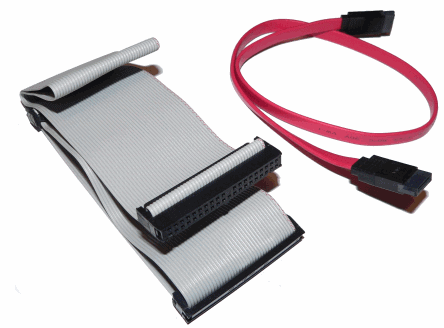
Check connectivity cables between motherboard and hard disk and ensure they are working fine without any short circuits. Better check with new cable or else check old cable on other working computer.
Check your Motherboard
If your hard drive passed the diagnosis test, cables working fine and first boot device is perfect then mostly problem persists with motherboard.
Follow this order and check your luck and i hope this No boot filename received error won’t create any trouble for you and this guide helps to solve your problem.

So I have a OptiPlex 7010 with Win. 10 on it and this appears on my screen. It will boot up the pc just fine, but it’s concerning. Can you help.
so i think my hard drive is dead i dont care about the info on the drive all i want us my pc to work so in order for my pc to work do i have to buy a new hard drive
In my case I got this error while deploying a VM in ESXi. I got the iso image from disc, but I had forgotten to click on “Connect at power on” on the “CD/DVD drive” tab. When I checked this box, no more errors.
I am getting a error when I turn on of my IBM server x3400 the error is below :
Fatal error : controller monitor failed. Controller not started.
I had also dusting of server but not resolved
Plz help me
Running Windows 7 pro.My daughter deleted some files, everything was fine until we turned the computer off. Then it wouldn’t boot back up. Getting “No boot filename received”
I put another hard drive in and everything worked fine.
The computer came installed with Windows 7 and no recovery disc. I don’t have a backup img. I really need some data that was on the hard drive, any advise?
If you have important data on the hard disk, connect to it another PC or Laptop as external hard drive. It helps you backing up important files easily
Use HDD to USB connecter (https://amzn.to/2ytfVye) to use it as external hard drive
Thank you, I will give it a try
Thank you very very much.
Thank you for your sloution now my pc is getting boot
Excellent advice. Thanks
I am trying to load PXE environment to get an image off of remote site (Denver) and this is the error I receive. Any way to figure out how to get this fixed?
Try using your windows original cd boot to it and run repair one your run the repair reboot the PC and you should be up and running again.
I too got this error. I cleaner my pc with a blower, formatted and repartitioned my hard disk installed fresh OS. Still getting this error. How to repair my HDD?
Hello Amar,
the same problem was faced by myself some weeks before but was automatically resolved after i restarted my computer.
Siddhant
Sigh… This does not solve the problem I’m having… Seems like once you search for this error message you just find “solutions” that boots from harddrive before network… I’m actually having troubles getting my PXE-environment set up correctly! (I guess I’m a minority though)
Me and you are in the same boat!
it also happened with me some days ago…but i resolved it easily by formatting My LAppy…
Once a day I also receive the same problem 2 times…
First time I just format my harddisk… Only the partition that I installed the OS (Operating System). And I get my harddisk back…
During second time, I didn’t format it . I just shut down my pc and restart after 2-3 min. I got it back pc back…
Nice tutorial. My friend was receiving the same error but it corrects automatically 🙂
It was a strange problem i have seen ever, even my PC fixed itself when i reinserted all cables in the cabinet