
This article is outdated. You no longer need Bluestacks to send and receive WhatsApp messages on your computer. WhatsApp has officially launched native desktop apps and WhatsApp Web to access WhatsApp from your computer. We strongly recommend using them instead of Bluestacks.
WhatsApp is the latest smartphone messenger available for Android, Nokia, iOS, and Blackberry mobile platforms. It is just like a mailbox where there is no cost for messages and the same comes with Whatsapp. One can send unlimited messages, images, videos, and many more using WhatsApp. We know, that you might have dreamed of using WhatsApp on the computer as we do the same and found a way to send and receive WhatsApp messages from computer.
It’d be easier to send and receive messages on computer rather than on a mobile. So, We are sharing the way to send and receive WhatsApp messages from computer.
Steps to send and receive WhatsApp messages from computer:
Installation of Bluestacks App player:
Bluestacks App player is an awesome Android emulator which lets you use all Android apps on a PC. We can use the Android operating system on Windows using Bluestacks Emulator. But, one cannot feel the experience of Android phone, touching the screen and swiping the screen using games and applications.
Steps to install Whatsapp on Bluestacks App player
1.Download Bluestacks app player Here>> And install it following the manual installation process.
2. After the installation process starts, the app fetches all the required files from the web and it takes some time to install all the files. Maintain patience until the download completes.
3. The Bluestacks app opens automatically and now the emulator is ready to install Whatsapp in it. You have to sign up for an Android play account or you can login with own account, if you have any.
4. Now search for Whatsapp in the store. You can find different providers for Whatsapp. Just select the Android market and you can continue with the app installation.
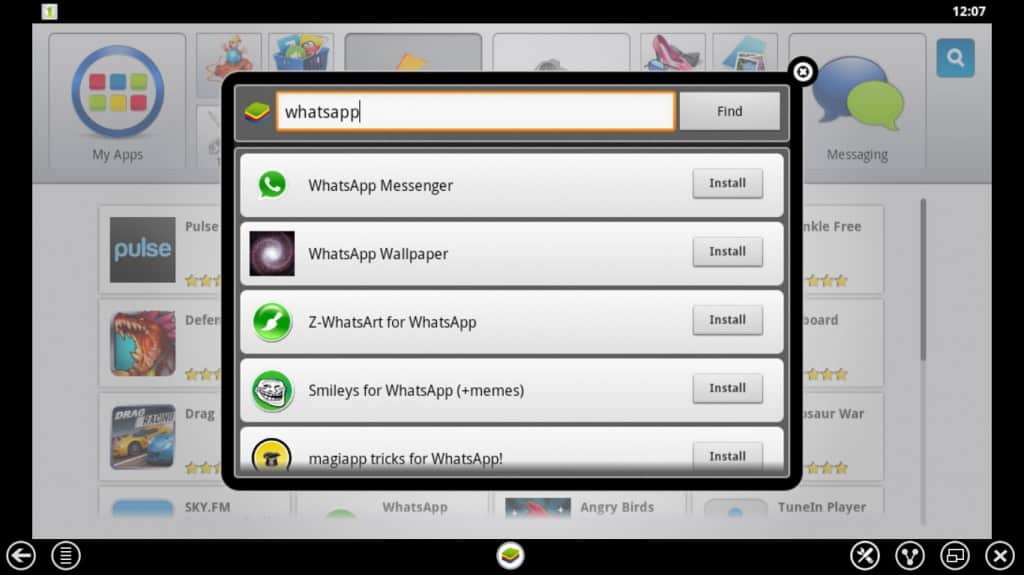
5. After the completion of the installation click on Whatsapp and accept terms and conditions to access the features of the App.
6. Now You have to add your mobile number and get verified by Whatsapp. Just after accepting the terms and conditions, a page opens which looks something like the below image. Choose your country and enter your mobile number which is active.
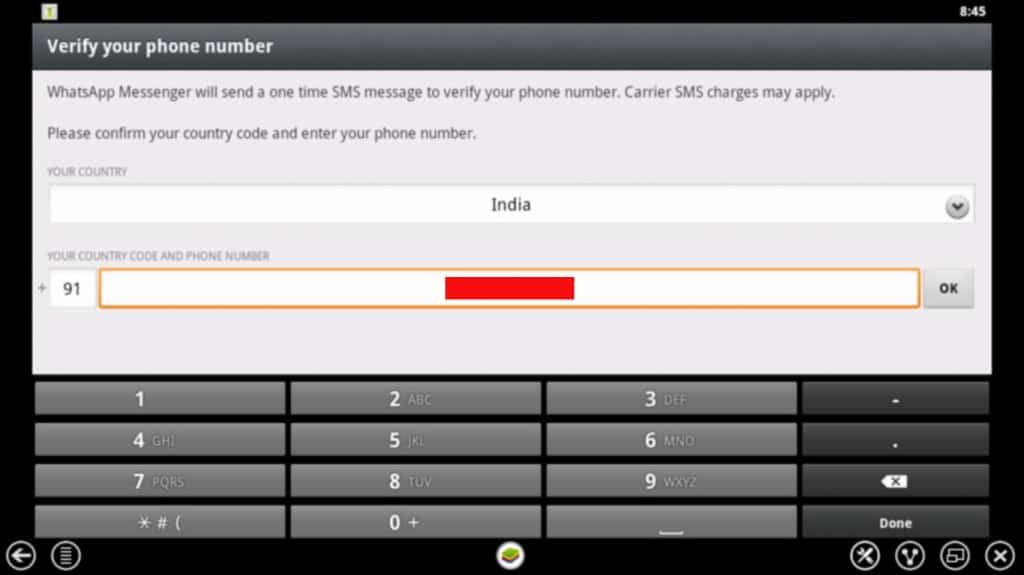
7. Whatsapp verifies the phone number entered for a while and it sends a verification message with a secret PIN in it. Or else we can choose an option to make a call. Listen to the PIN and enter in the app to get verified.
Finally, you are done. You’ve installed Bluestacks to send and receive Whatsapp messages from the computer.
What’s new on WhatsApp?
I think you are ready to send and receive WhatsApp messages from computer. If you have already used WhatsApp on your Android mobile, you can access all your groups and create new groups.
We know, the cost per SMS is increasing day by day and the only solution is using Whatsapp with which you can millions of messages per day. There is no limit for messages sent through WhatsApp.
The app stores the messages sent to you when the phone is switched off or when you are offline. The app doesn’t let you miss even a single notification from your buddies.
Cost of the App:
There are no hidden costs for using WhatsApp. We just require an internet connection to access the app via mobile or computer. The app is provided for free only for the first year of usage and later it just costs $0.99/year. The cost doesn’t even matter when compared with the standard SMS costs these days. Facebook has acquired WhatsApp in a huge deal and now WhatsApp is completely free for a lifetime.
Final words:
We hope you’ve enjoyed the tutorial to send and receive WhatsApp messages from computer. And we are sure that the tutorial helps you a lot. We would like you to suggest you make use of the Bluestacks app player to install and use your desired Android apps in it.

I don’t know how to use Blustacks WhatsApp
helo am Lameck am using pc to WhatsApp my friends but one thing I don’t understand is sending photos please help me
You no longer need Bluestacks to use WhatsApp on your computer now. Start using WhatsApp Web to send and receive WhatsApp messages, photos, videos, GIFs, documents, etc., on your computer.
I installed Whatsapp on laptop using Bluestacks but I cannot figure out how to invite friends or send and receive messages. I do not have a smart phone.
You do not need to invite friends to WhatsApp. Just save your friends mobile number in contacts application. Open WhatsApp, select “message icon” at the bottom of the screen, tap on your friend’s name and start sending messages.
if you can’t see your friends name, click three dots at the top of the screen and tap refresh.
Just use https://web.whatsapp.com and follow the steps. You don’t need all that above. I use it everyday.
How do i Send anonymous messages and Receive WhatsApp messages from Computer?
I have been abused , someone has installed my account on his computer and can read all my messages , how can I stop this
Bluestacks does not install on my lappy. It asks for a 2GB space. It is not the hard disk space, I guess, since there is plenty of space on HDD. What then is this 2GB space demand? What should I do to achieve successful installation of Bluestacks? Would be thankful for guidance.
just i installed whats app on my lappy , but how i’ll send messages to my contacts
Double click whatsapp icon or open bluestacks and enjoy messaging
i cannot receive message that my friend send to me …but i can receive message through group chat only…why??
I install whatsapp on bluestacks and also virify … how to send sms plz help
Hi, i am unable to send voice message on whatsapp in PC through bluestacks.
when i hold record button and after recording as soon as i release record button( on bottom right ), message disappears. Please help
Seems problem with microphone configuration. I will check in to issue.
Dear sir,
I have make groups on whatsapp in blustack in my laptop, I want to forward SMS TO SOME GROUPS BUT WHEN I FORWARD THE SMS THEN IT WILL SHOW ONLY ONE GROUP AND THERS LIKE INDIVIDUAL CONTACTS WHICH ALREADY ASSIGNED A GROUP. SO WHAT CAN I DO TO SHOW ALL THE GROUPS. IN CONTACTS GROUPS ARE VISIBLE BUT WHEN I SEND SMS THEN ONLY ONE OR TWO GROUP ARE SHOWING REST IS NOT….PLEASE SOLVE MY PROBLEM.
hi ,
i first configured my watsapp account on my pc .now i want to start it on my mobile….how can i proceed .
plz suggest
Using some file managers copy the backup file from your PC and then paste in on your mobile. While configuring whatsapp on mobile, restore that backup. Check this guide for “how backup works in whatsapp” https://geekdashboard.com/best-whatsapp-tips-and-tricks/
Hi; I have installed whatsapp on my laptop using bluestack. Do I have to verify my mobile number everytime i log into it? Is there no one time verification? Pl. reply.
i had installed Blue stacks on my laptop but it is showing an error stating: blue stacks not loading channels and some internet connection problem. Please help if anybody knows the answer.
You have to just check it out that whether your computer/PC having that much compatibility. If it has compatibility then sometimes video graphics required to run Bluestacks properly, So check it out again.
I Hope….. !!!
This will might definitely help to solve your problem. 🙂 Smile .
hell,
i am using whatsapp by laptop but i do not see video in my laptop
how to get the pics and music I hv downloaded 4m whatsapp..? I’m using whatsapp in lappy.. I m not able to find those files in my computer.. plzzzz help me
Downlad and istall QUICKPIC app from bluestacks and go to C:\Users\Public\Pictures\Sample Pictures
You can find entire whatsapp media
Thank you Amar. It helps me lot.
Hi,
Is it possible for me to forward messages I receive on whatsApp install on my pc? If yes how do I do it?
Hi,
1. Select Message which you want to forward,
2. long press left click or double click on message then you will see on top 1 selected,
3 Go to right top corner, there will be right arrow and press it,
4 it will show contract list, select the contract and the message will forward to selected contract
enjoy!!!!!
I am using whatsapp through laptop. but unable to forward the message recd on whatsapp. please guide me how to forward the messages, which key is to be used? and how to upload profile pic from laptop. please help me
Hi
Nice advise but I want to know whether I can see same msg both on my mobile as well pc. I mean to say if I receive a message I got on my mobile and on pc too and in case my pc is off on my mobile and when i open my pc i got all the msgs I got on my mobile.
Can I also see and store past chat history which I have deleted from my mobile due to space constrain.
Looking forward for your advise.
With warm regards
Paramjit
Yeah! You’ll get messages on PC and mobile at same time
how can i receive simultaneously because its failing to verify both devices same number. pc android emulatorb and android itself
tried to install bluestacks on my windows pro tablet and it wont because it says that its need to update ny video driver but all drivers are update, can you help please, you can email at rb197669@gmail.com
thanks
Surely you must require bluestack compatibility video driver. It happens.
Hi, I am not able to install Bluestacks as it gives me an error of “It requires 2gb of Physical Space. I already ave 3 gb free on my C drive. Any Solutions?
I have installed whatsapp on my pc. Is it necessary that my mobile in on for me to send and receive whatsapp message on my PC? How does the whatsapp message sent to my mobile appear on my pc?
No need, you mobile may run out of power. You can get all those messages in your PC
Hello ALL,
i AM using whatsapp from ma lap..its workin fine.. but i want to get added to one existing group.. eventhough owner of that group is adding me, i am not able to receive r getting added into that group… any suggestions ?
Initially I had whatsapp on my phone and I was added to one group. Now I am using whatsapp on PC thru bluestacks and I don’t know how to make the group visible on PC.
Did you figure it out ?
It should show by default
All contacts working properly? Are you facing problem only with Groups ?
I’ll answer you as soon as possible. It is very easy to do. But I want to tell you it by pictorial so that you can understand so easily.
Hi, thanks for posting this. What to do about Whatsapp error “it can only be used on one device at a time”?
I want to send files from it. I mean my own files at desktop,etc etc
HOw can i do that?
i feel like finding the default path in windows directories(of the default images folder which is shown in the whatsapp)
but am not getting that path 🙁
ANy1 has any idea regarding this??
Hi, I’ve been told that its possible to use a home number for whatsapp on pc. just wondering if this is true? if it is how do you do it
Hi..i have little differnt situtation here..i have got to send an email on whatsapp…is there any way ..i could forward emaill on whatsapp?
No, you can’t do that
Send email to particular man (Individually)
I installed it all but I don’t want Bluestacks to run all the time when I’m on my pc. Do I still receive messages even when BlueStack is turned off or does it need to be on all the time?
hello bro.. Im using 1 mobile numbers but I cannot access my Whatsapp if im on laptop.. they cannot sync on both devices is it? mobile phones and laptop? im using android Alcatel OneTouch Glory 2S..
please help me..:)
just a simple nokia 1600.. i am able to use facebook by dialng *325# nd able to get notifications also.. is der any same kind of feature???
hey is der any way to get whatsapp aler tmess to my mobie wic does nt support whatsapp instead i am using in pc through blue stack????
Can i know your Mobile model number and its brand
Thanks
hi im receiving an error whenever i try to install bluestacks on mine pc win7 64bit its show the the software not compatible with bitdefender but i dont have any bit difdefender install on my pc.
Have you ever installed Bitdefender on your PC ?
sir i have bitdefender in my pc !! m unable to open bluestacks..!! help me out !!
Are you using windows 8 ?
Whatsapp!
with skype and other messengers… this tools will surely get a good fight…
I am unable to send any files or pics thru whatsapp bluestacks.. i tried drag and dropping.. it doesnt go.. please suggest if there any settings i should do???
I have downloaded bluestacks on my pc and whatsapp is working fine, i would like to ask if it is possible to use two mobile numbers on my pc using bluestacks for whatsapp or its only limited to one mobile number?
Only one number..
Thanks for this post. I hope in a easier online app soon 🙁
Thanks for this post. I hope in a easier online app soon 🙁
bluestacks app does not work previously it worked but all of a sudden it went off and refused to work even after re-installing
What was the exact problem ?
yes i can paste it on word or note pad or gmail but cannot paste it on whatsapp.
for eg: i wanted to send my friend some info from wiki, i copied the matter from wiki but cud not paste in the whatsapp window
yes.i can copy from other pages but cant paste the matter in whatsapp
so, are you able to paste the same in other applications excluding Whatsapp ?
yes..i can paste elsewhere but cant paste on whatsapp..
It seems this problem is same for everyone. I tried on my PC and i failed to paste in WhatsApp. All we need to do is trying it completely. I will ping you when i got any solution.
hi,i have installed bluestacks and can access whatsapp however i cant copy and paste on whatsapp..pls help
have you tried dragging mouse over the text ?
yes,whatsapp will work on ur pc n mobile phone too
i have whats app on my phone…and i just downloaded bluestacks on my pc..i want to know whether if i use the same number i’m using on my phone for the bluestacks on pc….the whats app on my phone will still work as well as that for the pc
yes, it will work perfect simultaneously on both devices and yeah, you have to use same number on PC as well
Whatsapp tells me it can only be used on one device at a time, so I have to go through the verification process every time I switch from PC to phone. Is there a workaround?
excellent..i installed bluestacks n got the whatsapp working..m very pleased with this app..cheers to your team…god bless
HI,
i WANT TO SEND sms TO MY FRIENDS VIA USING WHATSAPP IN MY PERSONAL COMPUTER(WINDOW-7).THOUGH I HAVE DOWNLOADED BLUESTACKS FOLLOWED BY WHATAPP BUT I AM UNABLE TO SEHD MAY OF THE MESSAGE ON THE FRIENDS MOBILE NO.. THERE IS NO SUC OPTION COMING WHERE WHATSAPP IS ASKING FOR THE MOBILE NO.PLZZ HELP ME OUT TO RESOLVE THE ISSUE SO THAT I MAY COMMUNICATE WITH MA FRIENDS
bluestacks will work perfectly. Try it again
Hi Ajay thanks for the grate information really this software helps me
Just installed and guess what it is working for me.Thanks a lot,now my favorite app is with me on my PC.
after installing it .
does it effected the your PC’s processing speed ????
my friend is there ant other way to use whatsapp on pc because this blue stack application is making my pc slow
I will research on it and post it soon.
#Stay Tuned
yes, sure waiting for your next post related to this because if it is possible then you are going save my lot of time because it wastes my lot time to message on mobile..
thanxxxxx