
This article is here to show you how to Download YouTube videos in different ways. YouTube is the largest video sharing site by Google. Millions of videos are uploading every day on YouTube. To maintain the popularity of YouTube, Google has decided not to provide a download option on YouTube. Even this option is disabled for registered users too. So, there is no official download option to download YouTube videos. There are many online and offline third-party applications to download YouTube videos. Many of them may not work properly always and some of them would really suck.
A daily visitor to YouTube only thinks to download YouTube Videos. So, I tried plenty of softwares, online sites to download videos from YouTube. Here are my recommendations.

What is the need to Download YouTube Videos?
Some users may think why people show much interest in downloading YouTube videos. They think so because their internet may not be lightning fast. Recent Survey says 80% of Indians are using the internet form the mobile connection. Such users always think to download YouTube videos and save them on their PC or mobile. So, they can see their favorite videos directly on their computers without connecting to the internet.
Here are 6 best tools available to download YouTube videos to your computer
YouTube recently added a Download option on its iOS and Android app. The user can download the videos and watch them anytime without internet. But there is a catch, you can not share/move the downloaded apps to PC or other devices. You can only watch them on YouTube application and your device should be connected to the internet once in a month to keep the downloaded videos.
Here are 6 YouTube downloaders you should try if you are not happy with YouTube offline features.
1. AceThinker Video Downloader
Along with YouTube videos, AceThink video downloader is also able to download videos from various video-sharing websites like Facebook, Vimeo, Dailymotion, etc. It is available as both an online tool and software. If you don’t like installing software on your machine, then online tools come handy. It is also useful when you just need to download a couple of videos.
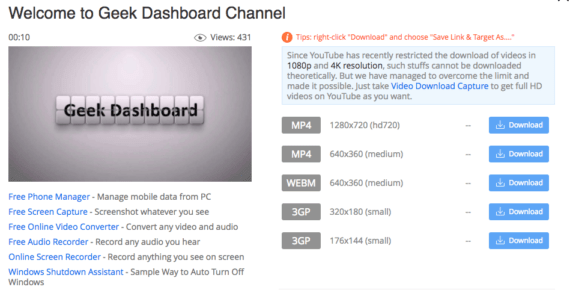
In case if you are daily video downloaders, it is suggested to get the Pro version of AceThinker. This tool works on all modern browsers. All you have to do is, enter the video URL, select the video quality and you are done.
2. Airy
With Airy you can easily download videos from YouTube in MP4, FLV and 3GP formats. It can fetch HD and Ultra HD quality videos whenever available and you can also extract audios to MP3 format separately. Airy is currently available as a software application for both Windows and Mac operating systems.

All you have to do is copy-paste either YouTube video/playlist URL and select the output quality, and Airy will take care of everything in the background. It also has browser extensions for Google Chrome, Firefox, Safari, Opera and Microsoft Edge which helps you download the videos quickly.
3. YouTube Downloader
The best Software available now on the web to download YouTube videos is YouTube Downloader. Don’t think about its name, I too confused first by seeing its name. Don’t think it will download the entire YouTube.
How to use YouTube Downloader
- Download and install it on your Computer
- Open it and paste Video URL from YouTube. Click Download
Benefits with YouTube Downloader
- Downloading Videos with YouTube Downloader allows you to download the required video in any format and resolution.
- Another good thing is, it is available on the internet for free
4. Keepvid.com
Keepvid is an online site that allows you to download YouTube videos in just a single clink. To Download just copy-paste the URL of the video you wish to download in KeepVid textbox and click download. The most interesting feature is no need for software downloads and installations
Backlog
One main backlog in this Keepvid is, it allows you to download any video only in .flv format and fixed resolution
Update: KeepVid is no longer supporting video downloads. They are now concentrating on video converter tools.
If you are looking for an alternative for KeepVid, then you should try WinX YouTube Downloader (Available only for Windows)
5. Downloading with Plugins
Good news for Google Chrome and Mozilla Firefox lovers. Now, Plugins are available for both browsers to download YouTube videos using plugins
For Google Chrome – Allows downloading YouTube videos in any format like MPEG4, FLV e.t.c
For Mozilla Firefox – It is the easiest way to download videos from YouTube for Firefox users
Recommended to Read: How to increase Torrent Download speed in 5 simple steps
6. Adding Save YouTube in URL
Save YouTube is similar to Keepvid. Save YouTube has an even simple feature to download YouTube videos. Just add save to YouTube in URL and click Enter
How To :
- Open video in YouTube you wish to download
- Now, you can see Video URL in your browser. It looks something like this www.youtube.com/watch?v=XXXXXXXXXX
- Just add save at the beginning of the URL and click go. It should be like this www.saveyoutube.com/watch?v=XXXXXXXXXX

Thanks for your nice review! I’ve got more YouTube downloaders to try now. Currently, I use 2 downloaders – one for online and one offline. As for online YouTube downloaders, I’d like to recommend 2conv. You can download YouTube videos by copying and pasting its URL. But fewer output formats you can choose and you can’t download some YouTube videos because of their copyright. As for the offline one, I use Joyoshare Screen Recorder. It can simply record any YouTube video in 1080P with no time limit. By the way, you can choose a lot of output formats that compatible with your devices. It is a paid program, but cost-effective I think.
Hello, you can also try Tube Geter and download playlist from Youtube.
Works great and its easy to use tool.
Follow easy steps to download:
Step-1) Go to TubeGeter – download the entire playlists from YouTube in seconds.
Step-2) Download and install the software.
Step-3) Then just copy the link from your browser and click ‘Paste Link’ in the application.
Thanks. It’s a good review. But Keepvid shuts down now and it’s supposed to be updated. You may add hd video converter factory pro to the list, which is a good option.
Good to know these video download tools and thanks for the sharing. I always use acethinker video downloader to save YouTube videos to my laptop, It is a free cloud based software to download videos without install any software in your device. You might add it to the list.
Thanks For this information. All the resources are the best one. But I am using fetchy.io where we can download videos from youtube, vimeo etc. and we can convert video using it.
My choice – 5KPlayer. Free but clean and safe.
I found it on YouTube video, which introduce how to download YouTube. A little bit funny. But it works great for me since I installed it on my Windows 7. I can select the video definition and formats before downloading. What a delight that I also use it to convert video to music. Good program.
Hi Amar, thank you for the resources above, I will try them out altho I usually use RP to download my videos from sites like Metacafe, Vimeo, FunnyorDie and other video sharing sites: http://www.real.com/realdownloader
The Best way in the address bar in video URL del www. and write ss
With RealPlayer I easily download online videos I find and save them to my computer. If you’ve installed RealPlayer for free, when watching a video online you’ll see the “Download This Video” button appear at the top right corner of the video player. Click that button, and the RealPlayer downloader will download the video to your computer and store it in the RealPlayer library.
Good share. This was also a helpful tool when I was first learning how to save and convert my videos as flv files: http://www.real.com/resources/download-convert-flv
I use GreaseMonket script for this purpose.
where i can download update.zip file?? is it downloaded through the mobile phone??
Download link is provided for update.zip
Hello Amar,
Thanks for pushing my knowledge about YouTube little more. Till now i was using keephd and speedbit video download to download Youtube. Now going to use all your tactics… Thanks 🙂
Romy Bro,
thanks for your feed back and yes, speed bit video downloader works fine for me too
I will tell you the 5th method. You can just watch the video once and the video will be saved in your cache memory. Just a cache video converter( i dont remember the name of the software exactly try googling) and it converts the cache file to viewable video. so no need to download it again.. It saves a lot of bandwidth..
You are right Sumanth, i too heard about that method. But that method might be difficult for newbies. Any else, Thanks a ton for another awesome method
At this time i am downloading YouTube videos with IDM but these are also very good options.
Yup!! IDM works fine too
There is another simple trick…read my aritcle @ibhavesh.in i’m not promoting my site…just helping.. 🙂
Thanks Bhavesh, I will add this one in “Downloading with Plugins”