
Running a blog and disparately looking for some genuine likes from your own visitors? Premium Facebook Fanpage Promoter is simple and awesome WordPress plugin which is capable to convert visitors in-to Facebook Fans. Likes on your blog’s fan page indirectly say’s how popular is your site on Facebook. As almost everyone is regular on Facebook these days, those new likes added on your page might help your blog progress. Even sometime your visitors will turn in-to a reader with single like. Then why should you omit these Facebook likes, I strongly recommend you to use Premium Facebook Fanpage Promoter to get genuine likes without 0% effort. No doubt, it is one of the best WordPress Plugin to get more Facebook likes
What is Facebook Fanpage Promoter?
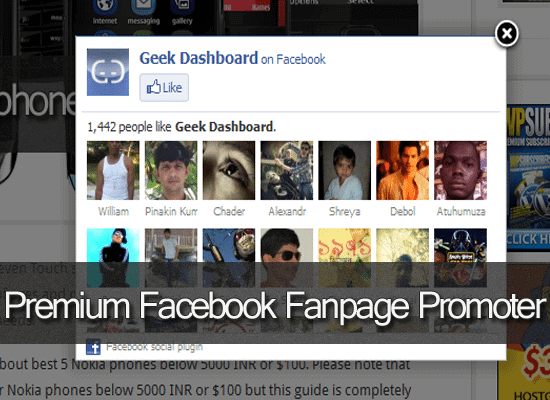
Facebook Fanpage Promoter is a Free/Premium WordPress plugin which uses your Facebook Fanpage Numeric ID and integrate it to your blog to get some Genuine likes. In detail it is a kind of pop-up appears on every pageview (It has some options to mange the places of Pop-up’s) suggesting the visitor to Like the Fan page.
Why I’m recommending Premium Version?
There was a reason why i was recommending my blogger-friends to go premium. I too started using Free version earlier and observed Awesome results and later i found it is creating difficulties for users who are visiting my site via Mobiles. As this site deals with Mobiles and Computers, about 10-15% of visitors are visiting from mobile. This pop-up is irritating those users and sometimes it becomes quit difficult while closing it.
So. i decided to go with Premium version as it has more options and even an option to stop this popup for Mobile visitors. Apart from hiding popup from mobile users, it includes options to adjust the background color, pop-up size and much more. You can know about them from below lines.
Premium Facebook Fanpage Promoter Options
If you have purchased the Premium Facebook Fanpage Promoter from their official site, then you might have got access to the download link. Once downloaded, upload that zip file to your plugins directory and activate it. You might see new column on your WP Dashboard with name Arevico Setting and you might see the options as shown in the figure.
1: General Options
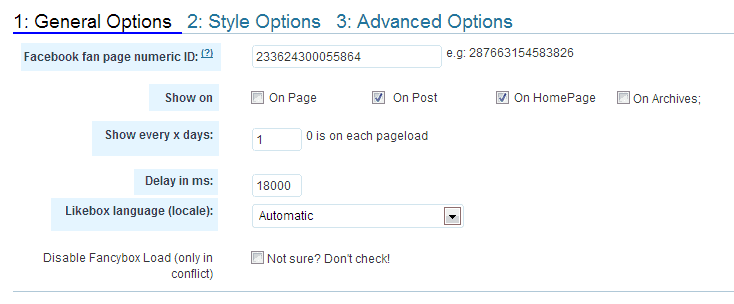
Under General options you might see options to enter Facebook FanPage numeric ID (“233624300055864” in our case) and other option asking you whether the popup should shown on Posts or Pages or on Both. Including these 2 options there’re even extraordinary features like Delay Time, Like box Language etc..
2: Style Options
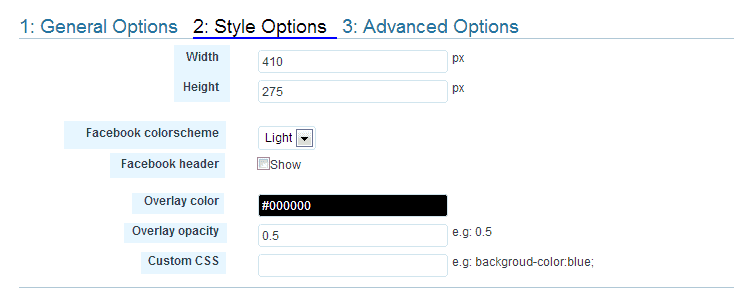
The size of the popup, i mean Height and width can be selected in this section and you won’t get this option in Free version. If you’re using dark background blog you can select Dark Colour scheme or else Light Colour Scheme. You can use your own Colour overlay and Overlay opacity or even you can use your own Custom CSS
3: Advanced Options:
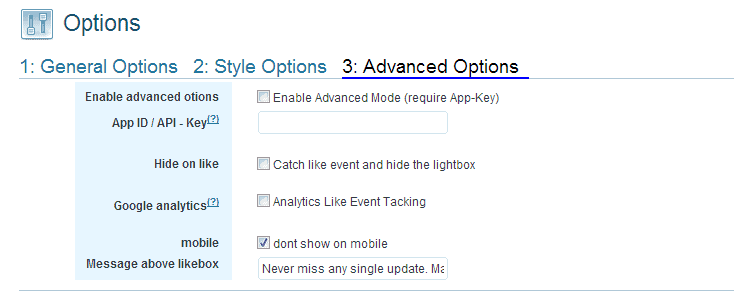
In advanced options you might see some hell awesome options to manage App ID, Mobile popup and even message above likebox. All these Advanced options are not available on Free version.
Also Read: Top 10 Must Use and Best WordPress Plugins
Over to you
Then you might now got a clear understanding about Premium Facebook Fanpage Promoter and why you have to go with Premium version. Also you might got cleared about extra options in Premium Facebook Fanpage Promoter and which options are missing are missing in free version. Kindly go through all your requirements and decide yourself whether you need Premium Facebook Fanpage Promoter or free version. But i’m suggesting you to go with Premium Facebook Fanpage Promoter as it contain many options.

Many thanks for this article. We will give it a go as very keen to get more fan followers.
Premium Facebook Fanpage Promote is a great Plugin.
And it really does a great job in getting you more fans on Facebook.
I really love it.
Thanks for sharing.
hey Amar,
Wow finally got solution to my problem as I wanted to convert my page visitors into fan followers but i think now I have got solution of getting some real genuine and real facebook fanpage by just this plugin.
Hi Amar,
Facebook fanpage plugin sounds interesting will surely use it to promote my page.
Nice Plugin. Thanks for reviewing and sharing this post.
Facebook fanpage promoter plugin seems really useful plugin to get likes from readers, will surely try this plugin. Thanks for the review.
i enjoy to read that because is very nice “” Running a blog and disparately looking for some genuine likes from your own visitors? Premium Facebook Fanpage Promoter is simple and awesome WordPress plugin which is capable to convert visitors in-to Facebook Fans. Likes on your blog’s fan page indirectly say’s how popular is your site on Facebook. As almost everyone is regular on Facebook these days, those new likes added on your page might help your blog progress. Even sometime your visitors will turn in-to a reader with single like. Then why should you omit these Facebook likes, I strongly recommend you to use Premium Facebook Fanpage Promoter to get genuine likes without 0% effort.””
That looks like a great plugin, Amar.
I used the premium version. Now, I’m more likely to use a popup, which has both an optin form and social buttons. But, I must say FB Fanpage Promoter is an amazing plugin. Using it should definitely boost the likes, quick.
Thank you.
Every new blogger must follow these tips. I have wasted over half an year to promote my blog through Facebook. Really informative post, I’m getting educated more and more about blogging here.
I’ve been using this plugin from three months and it doubled my facebook fans count. But, the only fault with it is it annoys the visitors.
i will try this for my blog thanx for information.
I still doubt on this app, does it really work?
Anyways you gave your points well.
I am currently using Social Traffic pop. Will try this out. Thanks for the information.
Facebook fanpage promoter plugin is the best way to increase facebook fans. I use such a plugin for my some blogs.
I am also using the Premium one only on my blog and i am loving it,it has also help me to increase my fans also
Hello, I think you mentioned all the points very clearly. I have my own blog and use this plugin. I did take advantage from this and get some important info. Thanks