
Have you tried Ninja Affiliate? What is your online income? Adsense? Direct Advertising? Paid reviews? Affiliate marketing? When we ask any bloggers about this question, most of them would say all of them. But they will say Affiliate marketing is the main source of their income. In fact, 60% of bloggers income is from affiliate marketing.
Do you know you can convert your content into money? Yeah! I’m right, why don’t you add affiliate links to your content. Ninja affiliate WordPress plugin from MaxBlogPress converts keywords in content to affiliate links which can drive a lot of income to your pockets. I’m using this plugin for one month and I observed some good results in my online income. This post is a small review on Ninja Affiliate WordPress plugin.

Ninja Affiliate Review
Check this small review on Ninja Affiliate premium WordPress plugin by MaxBlogPress and buy this plugin if you want to earn huge online income
What is Ninja Affiliate Plugin
Ninja Affiliate is an awesome plugin from MaxBlogPress which converts keywords or key phrases in a blog post or page into affiliate links. This plugin can do these things with zero effect from you. All you have to do is configure the plugin one time with your links and keywords and that’s it, this plugin will do all the remaining process
What does Ninja Affiliate contain?
- It adds affiliate links to keywords in blog post
- It is capable of making those links No-Follow or Do-Follow
- It is capable of opening those links in new tab, same tab or in new window
- It has an option to exclude some categories and tags while adding the links
- You can even order this plugin about how many links should be in each post. I mean if you need only 2 affiliate links in the post, it has an option to do it
- Style your affiliate links with different colors and sizes
- You can add same links to same keywords. In short, you can group more than 2 keywords into one. For example, you can add your Bigrock affiliate link to keywords like Hosting, Shared Hosting, VPS etc
- You can even track click on those affiliate links
How to use Ninja Affiliate Plugin
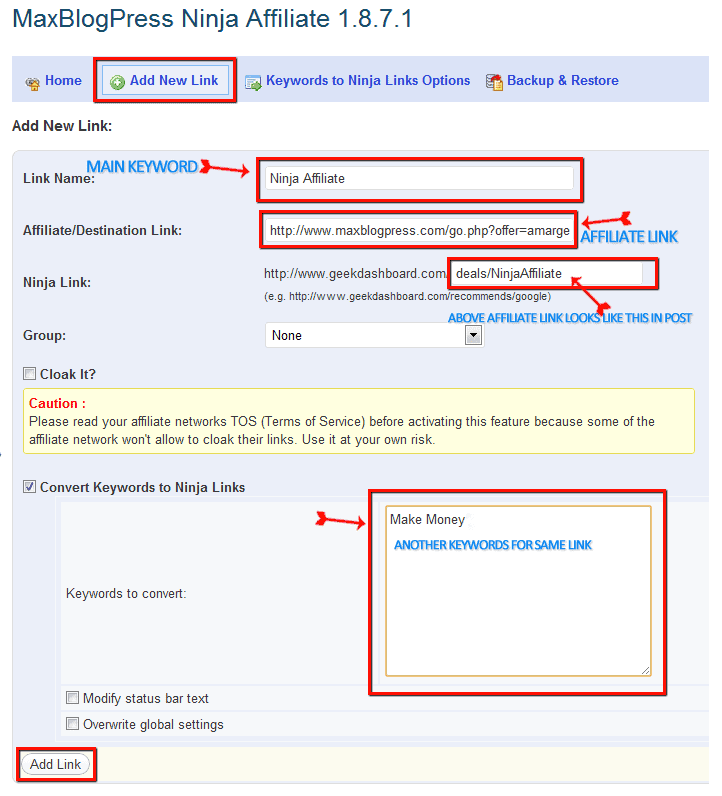
- Buy and Download the Ninja Affiliate plugin
- Go to Plugin Settings and click “Add new link“
- Add Keyword at “Link Name“
- Your Affiliate should be placed at “Affiliate/Destination Link“
- Make your own affiliate link at “Ninja Link” In my case I used /deals/NinjaAffiliate”
- If you want to add more keywords to your affiliate links add them at “Convert Keywords to Ninja Links“
Congratulations you have configured your link
Why should you buy Ninja Affiliate?
All things won’t come for free. We have to spend some money to experience awesome results. Think once, why don’t you spend just $97 to earn huge online incomes. In general, you can earn that amount in the single day if you utilize it in right way.

Nice plugin. I will try this plugin. Thanks for sharing a great post.
Hi,
Thanks for sharing this valuable post, Much appreciated. Keep posting such articles.
Really informative article on the Ninja Plugin! I have never really installed any affiliate plug-in on my blog before but this sounds like something I should try. Thanks for sharing!
This is a topic that’s near to my heart… Thank you!
Exactly where are your contact details though?
Hi Amar Ilindra,
I am finding a wordpress plugin which can help me to create a review page, for example: top10bestwebsitehosting.com or hosting-review.com. Please inroduce some plugins to me.
Thank you so much !
Very Nice Plugin, I will Try it soon. Now i am not having that much Budget, but soon i will try it out.
Contact me via Facebook or Mail. I can give you some discount in this plugin
Thanks for the review. i will use the plugin later
You are welcome Rafi and i recommend you to use this plugin. It can easily convert your articles in to money
it is very nice plugin i have used it…
I think you became a loyal visitor for my blog. Thanks for that mohit
This plugin is quite impressive !!
I am using two plugins Automatic SEO Links + Pretty Links to do this task at my blog.
Not a bad deal bro, but i think Ninja Affiliate is more convenient than using two plugins. Between Ninja Affiliate giveaway is running on this blog now. Participate and check your luck