
Rooted your mobile to enjoy hidden features? Wanna check if phone is rooted or not? Well this is a simple task and this can be done in several ways. Whenever i published any rooting guides in this site, many visitors keep asking me something like this “Hai man, followed all steps mentioned in the article and i doubt whether my mobile is rooted or still with old features. Please tell me how to check if phone is rooted or not” I think i got this kind of comments and emails hundreds of times. I replayed all my visitors to how to check if phone is rooted or not rooted.
Then i think i should write this as an article to save my readers time and anxiety. In this article you can know about simple trick to check if phone is rooted or not. In general there are different ways to check this step but i recommend to test your mobile with application as installing and handling application is far better than changing minor settings and entering recovery mode. So what’s in your mind now? Waiting to check if your phone is rooted or not? Then awesome, follow all steps mentioned below and clear your doubt
How to check if phone is rooted or not
As i said earlier, we can check this in many ways and here i’m trying to help my readers with one simple awesome way to check if phone is rooted or not.
Also read: 5 Best Android Applications for kids
I hope you are all interested to play with Applications on your mobile right? Then i think you know how to install applications from Google Play
- Well, Download this Root checker application from Google Play and install it
- This application works on all Android operating devices
- After installing the application, open it and you will see something like this on your mobile screen
- Click on Verify Root Access and wait for couple of seconds
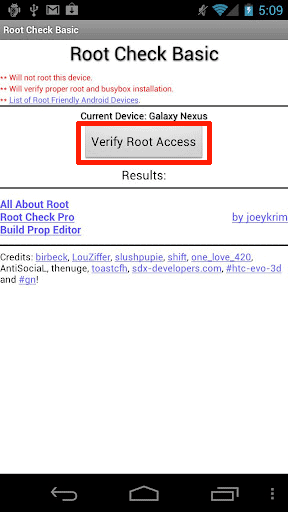
5.That’s it you can get a clear message on the screen saying whether that mobile is rooted or not

Know about the application
- This application won’t root your device
- This application only helps to check if phone is rooted or not
Consider sharing this article all over your social media profiles and subscribing to our feeds

Please, it showed your device has root access and my phone still ask me for software update….is that still ok?
it is OK but don’t it would crash the device
my galaly 5360 in the root checker it says “sorry this divice has no access” I confused does it mean it cannot or it’s not rooted, please help
It is not rooted yet. You should first root it
Very clear and concise tutorial. Great job. I addition to this post i also found the information on this page useful
Will this process work on my s7562? Anytime i take pictures with my phone,the picture either cuts in two or just goes blank.Will rooting also fix that problem?
I am just an average android OS lover; and this article was an excellent read. When I first got my GS3, I did think about going the root way. I really appreciate this site – great info.
my Samsung Galaxy Y is rooted
and it doesn’t vibrate on calls and texts only.. what should I do?
whole i am rooting… mine mob was hanged… its showing only galaxy y logo…. what i need to do… plz any1 help me….
Are you able to enter into recovery mode?
the problem it can just show samsung galaxy y gt-s5360 it cant boot at more plzzz help what can i do now?
You have made something fishy. All you can do is to restore original gingerbread. Use below link to detail tutorial
https://www.geekdashboard.com/how-to-unbrickflash-samsung-galaxy-y-s5360/
i have geroot its perfect no problems
I have updated my android , but it is not opening it is showing samsung galaxy…..la
root of ur sd card means not in any folder.
drs nothng to do with ur sd card
jst follow diz steps
first check wheater uh havin atleast 60-70% battery
follow dis on ur own risk any damage to ur phone is nothng of my concern
step1: download d update.zip file on ur pc
step2: go to setting-application developmnt n enable usb debbuging
step3: copy the update.zip file to the root of ur sd card. i.e.do not copy it in any folder.
step4: now turn off ur phone and then enter into its recovery mode
for recovery mode press power button+home button+vol up simultaneously
after d samsung boot logo appears leave the power button n wait
here u would get into recovry mode. ur touch is disabled so to move up n down use vol up n down. n home button to select
step5: now select d option apply update from sd
step6: go to the file update.zip n press home to select
step7: the stuff would run n u would get back on d recovry screen
so now select reboot system now
step8: now wait until ur phone gets rebooted…also wait till media scan is complete
step9: check for the superuser icon on ur menu..if u get that then uh hv successively rooted ur phone
what do you mean by the root of SD card, please elaborate this please.
Ihave a samsung ace gt8530 and after following all your steps; the phone wont root. can you please help.
i hav both comp. & android phone (5360 galaxy)
but i did’nt understand this .Will u plzz expkain it briefly?
If this rooting got fail ,is this phone get out or splash?
Plzz replay to me…waiting..
may be you are having a sd card which is higher than 2gb you will will need an sd card wc iz less for me i tried it and it worked for me
i wana root my galaxy y…bt m nt having computer at my place. can v root without d use of pc
pls help
yes..you can
🙂 Don’t have iPhone Btw nice post
Article is not about iPhone. This is about Android mobiles
Thanks
does it worked in any ones phone
i wil surely going to check this on my i-phone…thanks a lot….